Chrome extension · BBB business listings
Export BBB search and category results to CSV, Excel, or JSON
Open a BBB search results page or category page, click the extension, and download clean business listings for spreadsheets, CRM imports, and research workflows.
Built for sales teams, data researchers, agencies, and analysts who need repeatable BBB business data without manual copy-paste.
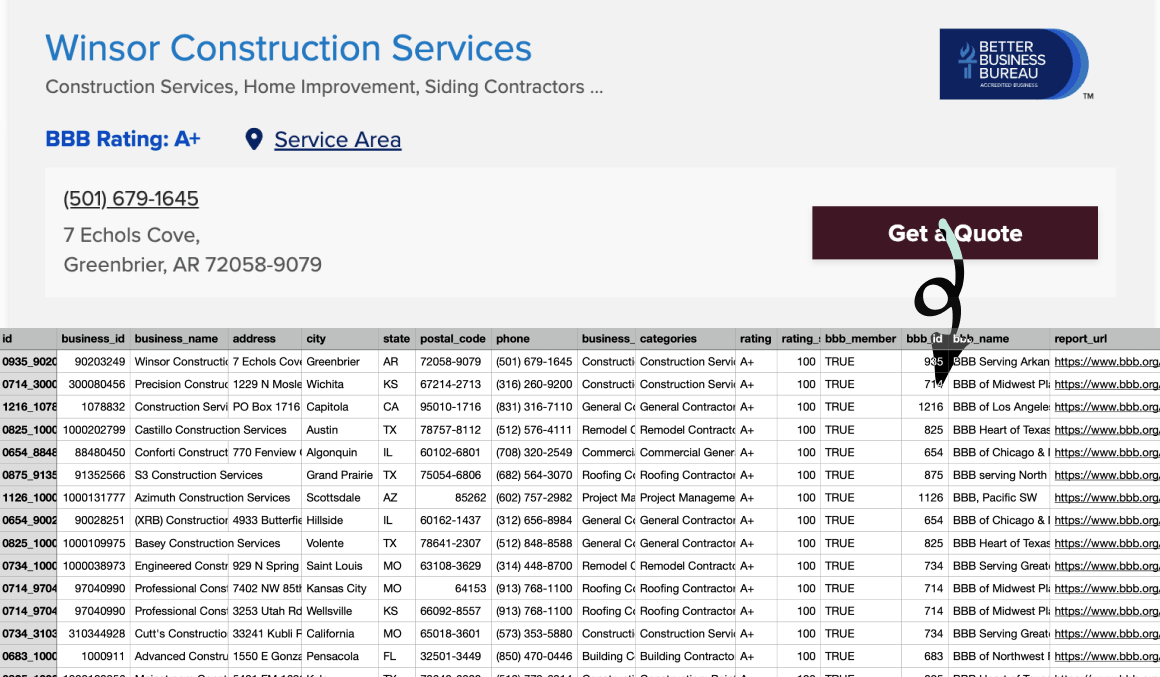
Everything you need for BBB listing exports
One extension for lead research, local market mapping, and competitor analysis, structured the way business teams actually work.
Export from BBB search pages
Open a BBB search results page, click the extension, and turn visible business listings into structured files.
Works on category pages too
Build datasets from BBB category pages when you are researching local service markets or competitor groups.
USA and Canada coverage
Collect business listing data from supported BBB pages across the United States and Canada.
CSV, Excel, and JSON
Download the same clean business dataset in the format your spreadsheet, CRM, or automation workflow needs.
Lead-ready business fields
Capture names, addresses, phone numbers, ratings, categories, quote links, service areas, and BBB report URLs.
Wait for the task, then download
Start the export from the extension, let the task finish, and download the finished file when it is ready.
22 fields in every export
Business identity, contact details, BBB metadata, links, quote availability, and service area signals in one row per listing.
Business identity
Core IDs and names for matching BBB listings to your own records.
- id
- business_id
- business_name
- business_category
- categories
Contact and location
Address, phone, and geographic fields for sales lists and market maps.
- address
- city
- state
- postal_code
- phone
- location
BBB profile data
Ratings, BBB membership, profile links, quote availability, and service areas.
- rating
- rating_score
- bbb_member
- bbb_id
- bbb_name
- report_url
- leave_review_url
- request_a_quote_url
- raq_enabled
- has_service_area
- service_areas_summary
Questions about field coverage? Check the FAQ or email help@niomaker.com.
How BBB Extractor works
Three steps from a BBB results page to structured files.
Open a BBB page
Go to a BBB search results page or category page for the market you want to research.
Click Export
Open BBB Extractor from your Chrome toolbar and click the export button.
Download the result
Wait for the task to complete, then download the file as CSV, Excel, or JSON.
Simple pricing for BBB listing exports
Start with real BBB search and category pages. Upgrade when your research needs larger exports.
Free
Try BBB business listing exports before you scale your workflow.
- Up to 20 records per export
- All 22 business listing fields included
- Export from BBB search and category pages
- Download CSV, Excel, or JSON files
Pro
For teams that collect BBB business listings regularly for sales research, market analysis, and reporting.
Pro is designed for heavier workflows where you need larger listing exports and repeatable data collection.
- Higher per-export cap
- Everything in Free, with a higher per-export cap
- All 22 fields on supported BBB search and category pages
- CSV, Excel, and JSON downloads for downstream workflows
- Priority support and updates while subscribed
Ready to export your next BBB business list?
Install BBB Extractor and move BBB search or category results into your workflow without copy-paste.
Get BBB ExtractorFrequently asked questions
Which BBB pages are supported?
BBB Extractor supports BBB search results pages and BBB category pages. Open the page you want to collect from, then start the export from the Chrome extension.
Which countries are supported?
The extension is built for supported BBB pages in the United States and Canada.
Which file formats can I download?
You can export business listing data as CSV, Excel, or JSON, depending on whether you are working in spreadsheets, CRM imports, or automated data workflows.
What fields are included?
Exports include business IDs, business names, address fields, phone numbers, categories, ratings, BBB member status, BBB organization details, report URLs, BBB action links, location data, and service area summaries.
Is BBB Extractor affiliated with BBB?
No. BBB Extractor is built by NioMaker and is not endorsed by or affiliated with BBB. Trademarks belong to their respective owners.
What should I know about terms of use?
You are responsible for complying with BBB’s terms of service, applicable laws, and any agreements that govern your access to business listing data. Use the extension only for scenarios you are authorized to export.
Do you store the business listings I export?
This website does not run the export for you. The extension starts the export from your browser page. See our Privacy Policy for how NioMaker handles account or support-related data.
How do I upgrade or see plans?
See the Pricing section on this page for plan details and upgrade options.